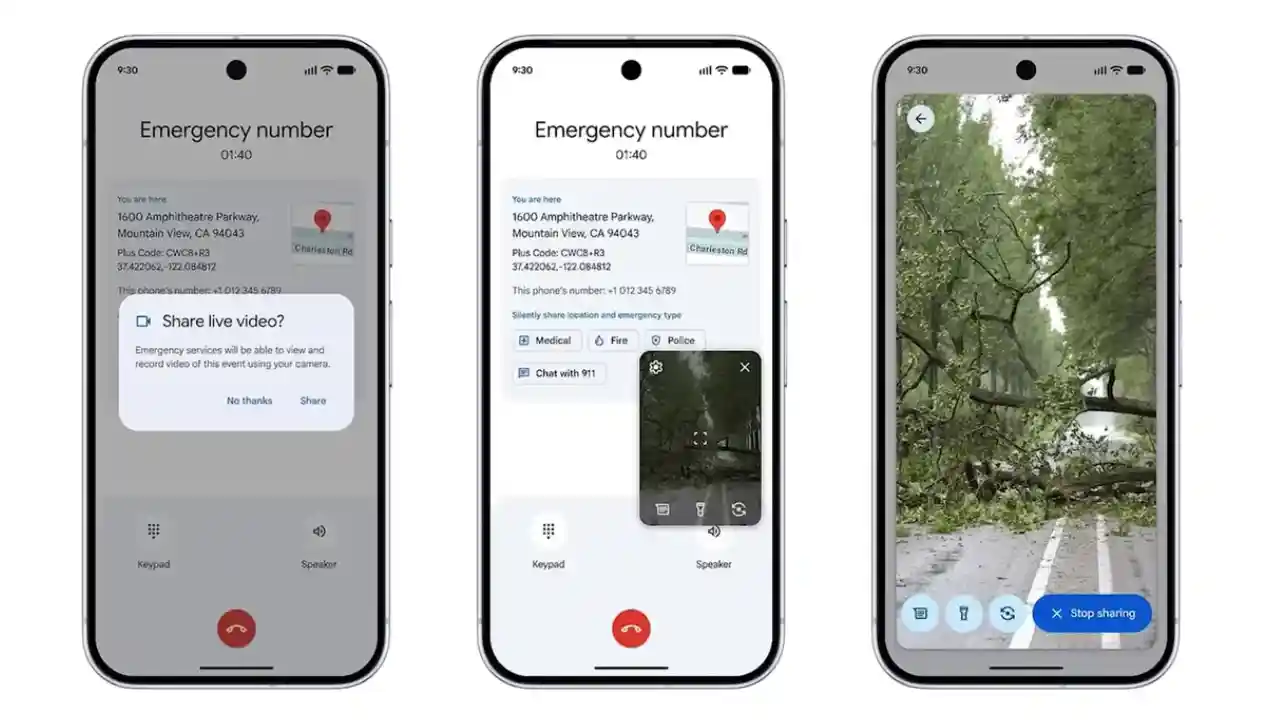

When seconds matter, words sometimes fail. That’s the simple problem Google is tackling with its new safety tool: Android adds Emergency Live Video Sharing to let dispatchers see what’s happening in real time. Instead of struggling to describe a crash, a fire, or a medical emergency while panic sets in, callers can now send an encrypted live video feed to 911 when the dispatcher requests it — and the caller stays in control to accept or stop the stream. This change builds on Android’s existing emergency systems and aims to give first responders clearer context before they arrive.
How it works — fast and private
The feature is built into Android (available on devices with Android 8 or later and Google Play services), so most modern Android phones will get it without extra apps or setup. During an emergency call or text exchange, a dispatcher can send a request for live video. You tap to approve, and your rear or front camera begins streaming to the dispatcher. The stream is encrypted end-to-end and you can stop it at any time. That means you remain in control of when and how much video you share.
Why this matters
Sharing live visuals can rapidly improve situational awareness. Dispatchers can see bleeding that needs immediate CPR instructions, the location of a fire, or whether someone is unconscious and breathing — details that are hard to convey over the phone. For responders, those early visual cues can change the type of help they send or the instructions they give while help is en route. Early partners in the rollout say it will help emergency services make faster, more informed decisions.
Where it’s available and who can use it
Google has started rolling the feature out in the United States and selected areas in Germany and Mexico, and it’s being integrated with public safety platforms like RapidSOS and other emergency systems. Wider availability depends on local emergency agencies enabling the feature on their 911 systems, so even if your phone supports it, the dispatcher’s side needs to be ready too. If you’re outside these areas, keep an eye on official updates — expansion is planned but depends on local partnerships and testing.
Practical tips if you ever need it
If you ever get the prompt to share Emergency Live Video, remember:
• You control the stream — accept only if it’s safe.
• You can stop streaming instantly at any time.
• The feed is encrypted, but avoid showing sensitive personal documents or banking info during the stream.
• If your area doesn’t support it yet, you can still use standard emergency procedures: call, give location, and follow dispatcher instructions.
My take
As someone who keeps up with safety tech, I find the Android Emergency Live Video feature a thoughtful and practical upgrade. It doesn’t replace voice communication — it supplements it when visuals can make a difference. The success of the feature will depend on adoption by emergency services and public awareness, so telling friends and family about the option could help it reach its full potential.